papricot Thank you for your inquiry regarding the FSC‑BT1035 module and external antenna connection. Here are the answers to your questions:
1. No, the onboard antenna is not automatically disconnected
When you connect an external antenna to the RF_OUT pin, the onboard antenna is not automatically disabled.
2. The correct method is to change the soldering position of the *0Ω resistors* on the module to connect the RF_OUT pin (Pin 51) to the external antenna.
3. Both resistors (labeled 1 and 2) are 0Ω resistors. You can connect to different external antenna interfaces by modifying the position and orientation of these two resistors as follows:
- Resistor 1 must be moved to the left to connect to the external antenna pad on the left side of the module.
- Resistor 2 should be soldered horizontally to connect the RF_OUT pin (Pin 51) to the external antenna.
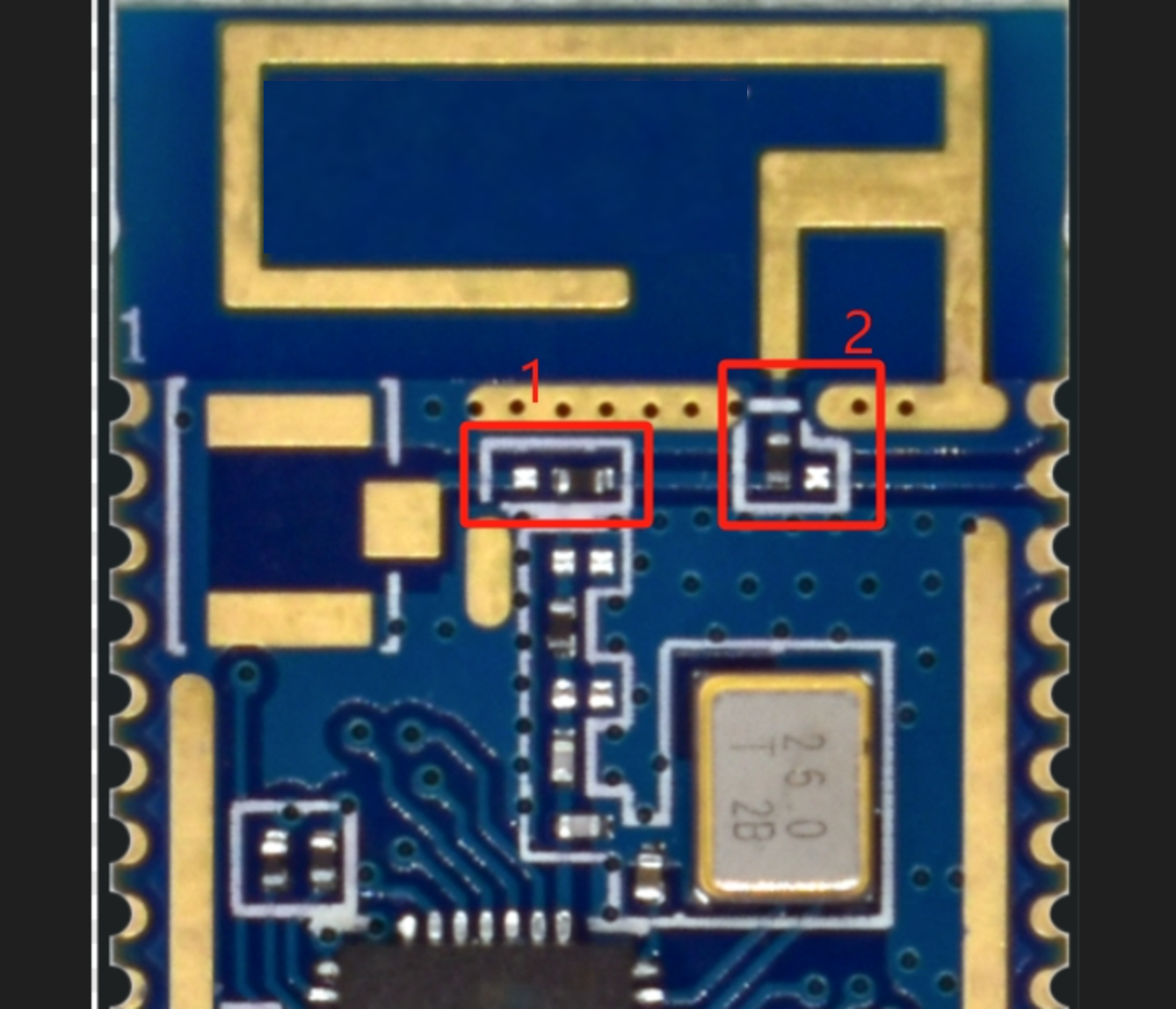
4. Feasycom offers three antenna specifications
You can contact Feasycom sales before shipment to confirm the default antenna configuration of your modules, or to specify the antenna type you require.
